The Pinterest Extension That Shows What Pinterest Hides
See saves, repins, viral score, pin age and keyword annotations on every pin, right inside your Pinterest feed. Free to install. No account required. Works in 30 seconds.
Pinterest Hides the Data You Need.
PinRadar Reveals It.
Pinterest Native vs PinRadar
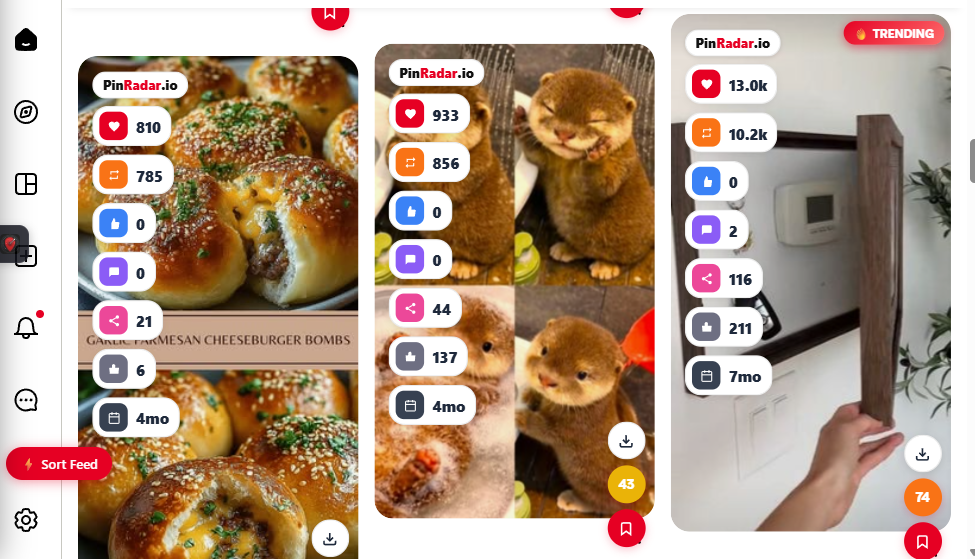
- ❌ Pinterest hides saves on other people's pins
- ✅ PinRadar shows saves, repins, likes, comments on every pin
- ❌ Pinterest hides engagement velocity
- ✅ PinRadar adds Viral Score (0–100) on every pin
- ❌ Pinterest hides when a pin was created
- ✅ PinRadar shows exact pin age with color-coded badges
- ❌ Pinterest hides internal keyword tags
- ✅ PinRadar reveals Annotated Interests and related keywords
- ❌ Pinterest hides pinner follower counts
- ✅ PinRadar shows follower count and domain source
- ❌ No data export from Pinterest
- ✅ PinRadar exports 29-column CSV to Excel or Google Sheets
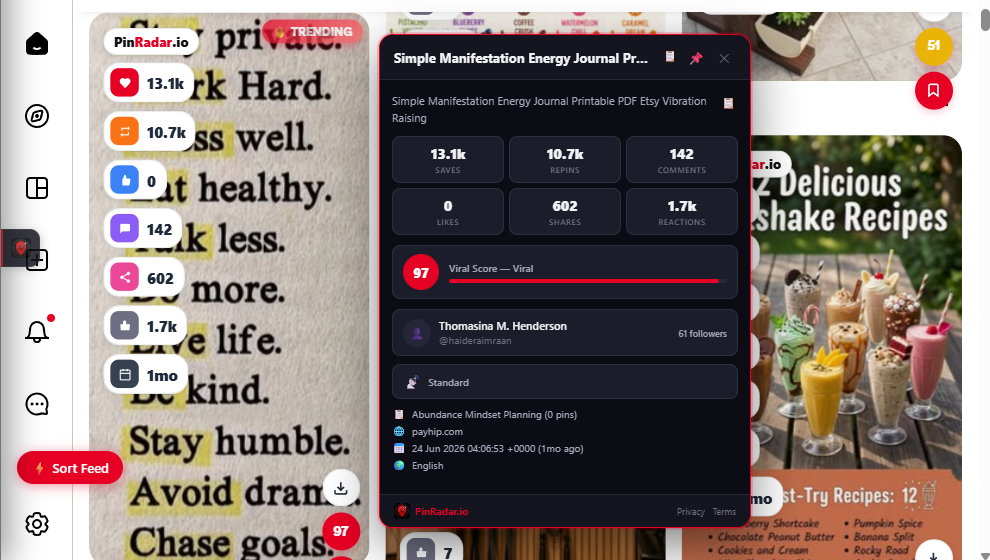
Hover any pin to see the full analytics popup
Free Forever. Upgrade When You're Ready.
PinRadar is fully functional for free. Pro unlocks deeper research tools for serious Pinterest creators who need a complete Pinterest keyword tool and analytics suite.
Free
FOREVER$0. No credit card, no account required.
- ✅ Stats overlay on every pin (saves, repins, likes, comments, shares, reactions)
- ✅ Pin age badge (green / amber / grey)
- ✅ Viral Score (0–100) on every pin
- ✅ Trending badge (🔥) on fast-growing pins
- ✅ Keyword volume badge on pins
- ✅ Hide ads & AI-generated content
- ✅ Dark mode
- ✅ Bottom action bar
- ✅ Pin Vault (save up to 10 pins)
- ✅ Passive pin collection
Pro
UPGRADEFrom $8/month · $29/year · $49 lifetime
- ⚡ Everything in Free, plus:
- ⚡ CSV Export — 29 columns (saves, repins, viral score, keywords, domain, pinner, board, date…)
- ⚡ Annotated Interests — Pinterest's internal keyword tags
- ⚡ Related Keywords — search suggestions per pin
- ⚡ Pinner follower count
- ⚡ Category tree (Pinterest's internal classification)
- ⚡ Per-pin download button (image / video / GIF)
- ⚡ Unlimited Pin Vault
- ⚡ Board Spy — analyze any competitor board
- ⚡ Board CSV export
- ⚡ Content Gap Detector — find missing formats in any niche
- ⚡ Sort Feed by saves, repins, or viral score
- ⚡ Bulk ZIP download
- ⚡ Pin Manager sidebar
- ⚡ Auto-Scroll
Install in 30 Seconds. No Account Required.
Add to Chrome
Click "Install Free on Chrome" and the Chrome Web Store opens. Click "Add to Chrome" and confirm permissions. PinRadar only requests access to pinterest.com.
Open Pinterest
Navigate to pinterest.com. The PinRadar overlay appears automatically on every pin, with no configuration, login, or setup required.
Stats Appear Instantly
Every pin in your feed now shows saves, repins, viral score and pin age at a glance. Hover any pin for the full analytics popup including keywords and pinner data.
Stats appear automatically on every pin — no setup needed
Everything You Can Do With PinRadar
See Hidden Stats on Any Pin
Hover any pin to open the full analytics popup. See exact saves, repins, likes, comments, shares and reactions. These are the Pinterest engagement metrics that are normally hidden from view. The Viral Score (0–100) measures engagement velocity. A pin with 55K saves and a score of 92 is still gaining traction fast. Pin age tells you exactly how old a pin is: green badge = under 7 days, amber = 1–6 months, grey = older.
Use PinRadar as your Pinterest stats checker to understand what content resonates. Knowing how to see pin saves gives you a competitive edge over creators who rely on guesswork.
Extract Pinterest's Internal Keywords PRO
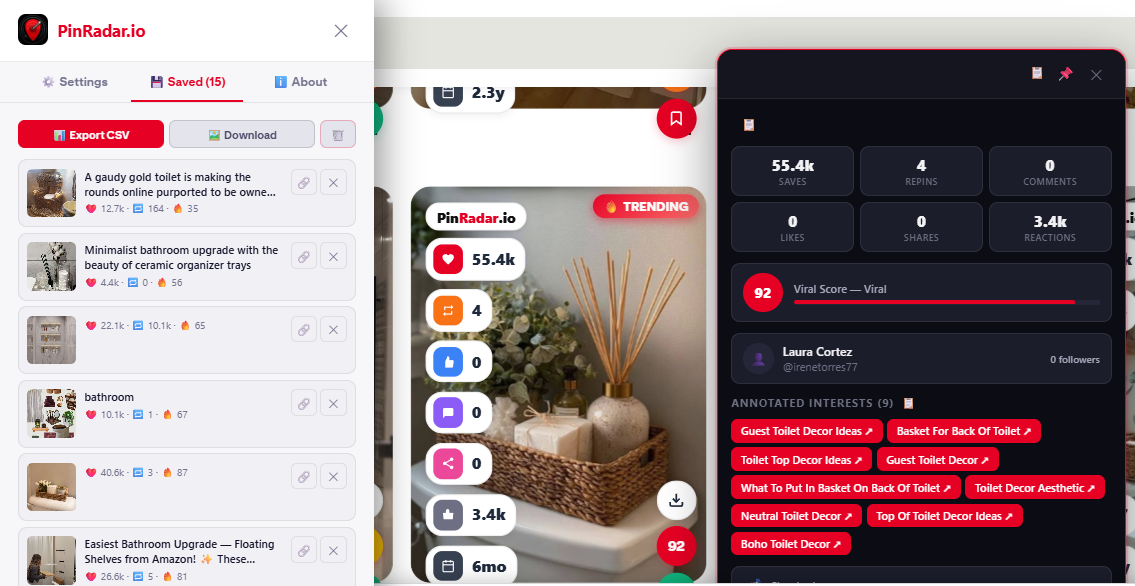
Every pin on Pinterest is tagged internally with Annotated Interests: the exact keywords Pinterest uses to distribute content to the right audience. PinRadar surfaces these tags directly in the hover popup, making them clickable and copyable. These are the keywords you need in your pin descriptions, board titles and profile bio to reach the right audience.
This makes PinRadar an essential Pinterest keyword research tool and Pinterest SEO tool. Understanding the annotated interests Pinterest assigns gives you a massive advantage for Pinterest keyword research over competitors using generic keyword tools.
Analyze Any Competitor Board PRO
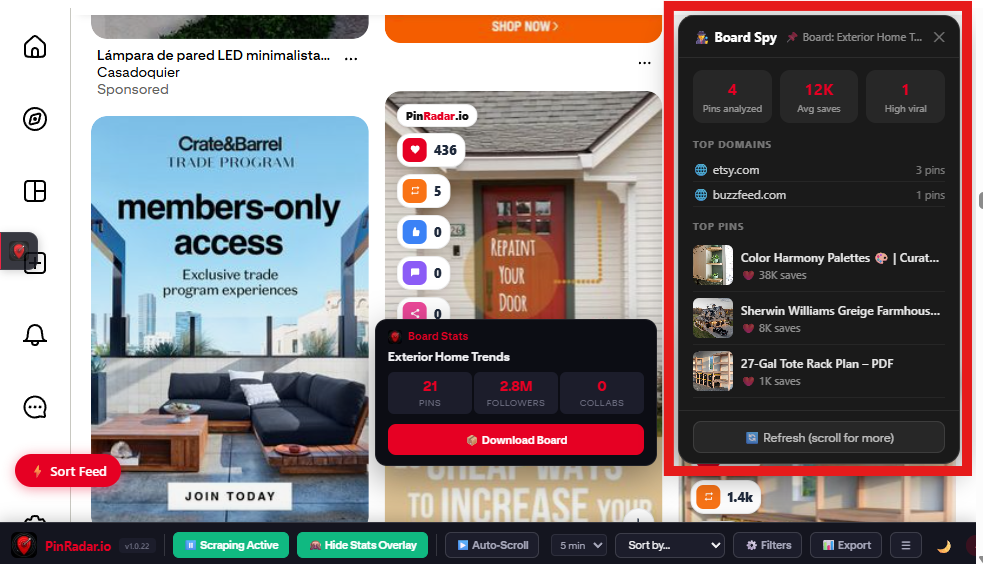
Navigate to any Pinterest board and open Board Spy. See the board's total pins, followers, top domains linking to it, and the highest-performing pins ranked by saves. Board Stats popup shows aggregate data: total pins, followers, collaborators. Use it to reverse-engineer what content works in any niche before you create.
Pinterest board spy and Pinterest competitor analysis have never been easier. PinRadar's Pinterest board analytics reveal which domains drive traffic, which pin formats get the most saves, and which content angles dominate the niche.
Find Content Gaps Before Your Competitors Do PRO
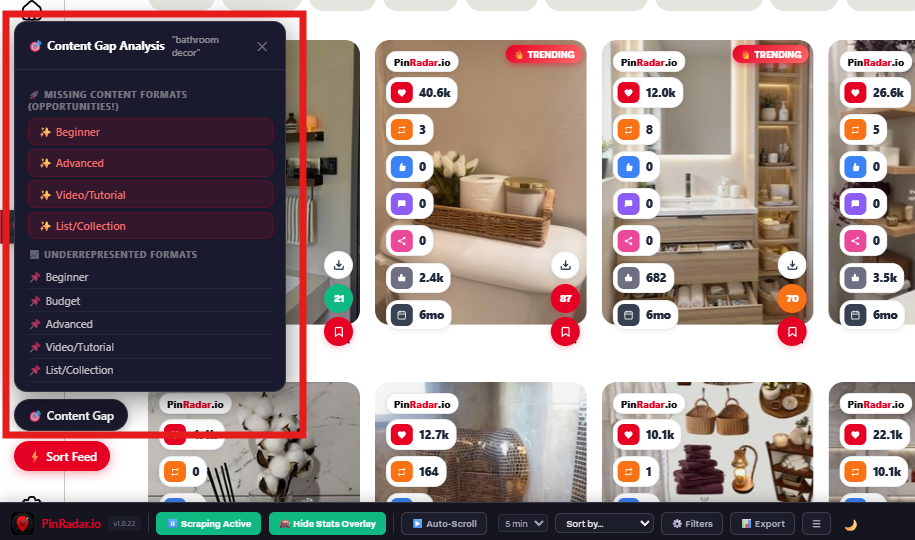
Content Gap Detector scans Pinterest search results in real time and identifies missing content formats in any niche: Beginner, Advanced, Video/Tutorial, List/Collection. See exactly which formats are underrepresented so you know what to create next.
No more guessing what content to publish. PinRadar’s Pinterest content gap analysis shows you the opportunities other creators are missing, usually before they even figure it out. It’s the unfair advantage for serious Pinterest creators and marketers.
Export Pinterest Data to CSV — 29 Columns PRO
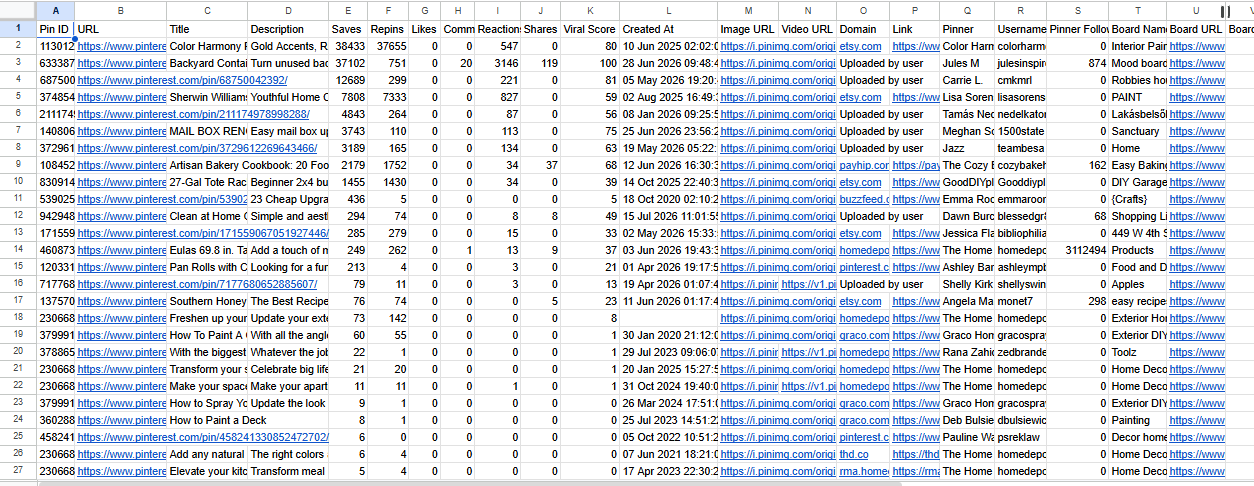
Export any set of saved pins to CSV in one click: 29 columns including saves, repins, viral score, keyword annotations, domain, pinner username, board name, image URL, video URL and creation date. Open directly in Excel or Google Sheets for deeper Pinterest data analysis.
Pinterest CSV export has never been this comprehensive. Use the data to track viral content, benchmark competitors, build content calendars or feed your own analytics dashboard. The most complete Pinterest data export tool available.
Manage, Sort & Export Your Saved Pins PRO
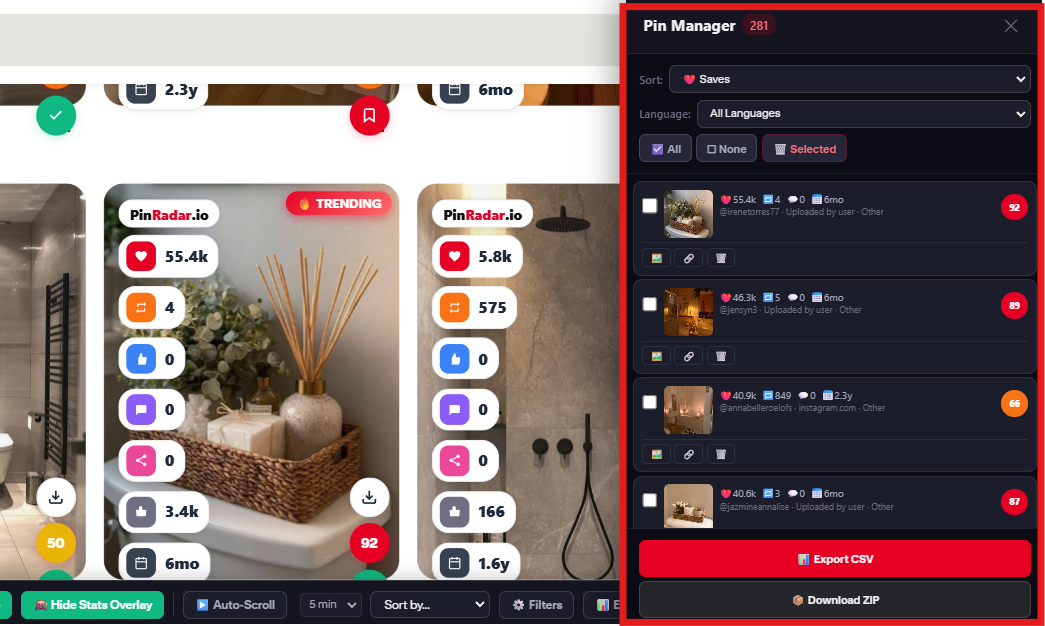
The Pin Manager sidebar gives you a full command center for every pin you've collected. Sort, filter, export and download, all from one panel. No more losing track of the pins that matter.
- ⚡ Sort by saves, repins, viral score or date
- ⚡ Filter by language or content type
- ⚡ Bulk select multiple pins at once
- ⚡ Export entire collection to CSV (29 columns)
- ⚡ Download all media as ZIP
- ⚡ Unlimited vault — save every pin you find
Frequently Asked Questions
Everything you need to know about PinRadar, the free Pinterest Chrome extension trusted by 1,300+ Pinterest creators.
Yes. The core stats overlay (saves, repins, viral score, pin age, trending badge, dark mode, ad hiding) is free forever. No credit card, no account required. Pro ($8/month, $29/year, or $49 lifetime) unlocks advanced research features: CSV export, keyword annotations, Board Spy, Content Gap, Sort Feed and unlimited vault.
No. Install from the Chrome Web Store and navigate to pinterest.com. Stats appear right away. No login, no signup, no configuration. If you want Pro features, you'll need to create a free PinRadar account to manage your subscription.
PinRadar operates locally in your browser. No Pinterest data is ever transmitted to external servers. All analytics processing happens on your device. When you sign up for a Pro account, we collect only your Google account name and email for authentication. See our Privacy Policy for full details.
PinRadar works on the Pinterest home feed, search results, board pages, and pin detail pages. Board Spy activates when you navigate to any board. The extension only runs on pinterest.com.
The Viral Score (0–100) is PinRadar's proprietary engagement velocity metric. It measures how fast a pin is accumulating engagement relative to its age. A score above 80 means the pin is trending. A score above 90 means it's going viral. Use it to spot content that's gaining traction before it peaks.
Free gives you the stats overlay (saves, repins, viral score, age) on every pin, which is enough to understand what content performs. Pro adds the research layer: CSV export, keyword annotations (Annotated Interests), Board Spy, Content Gap Detector, Sort Feed, unlimited vault and bulk download. Pro starts at $8/month. It's the best PinClicks alternative for Pinterest creators who need a complete Pinterest SEO tool.
Start Seeing Pinterest Data Other Creators Can't
Free to install. No account required. 1,300+ Pinterest creators already use PinRadar to uncover hidden engagement metrics and keyword insights.